WorkMonitor · Security & Privacy
A monitoring programme that survives an audit.
The question is never whether you monitor. It is whether you can show how. Recorded consent, capture policy enforced on the device, and a hash-chained log of every access to the record.
Nothing on this page is captured that the person cannot see.
- Window: Northlight redesign, Figma
- Screenshot at 10:42
- 1Password window
- Keystrokes: 1,240, count only
- Apple Health
- 12:05 to 12:50, private time
- Tab: figma.com
- Window: Northlight redesign, Figma
- Screenshot at 10:42, blurred on device
- 1Password window: never leaves the device
- Keystrokes: 1,240, count only
- Apple Health: never leaves the device
- 12:05 to 12:50, private time: never leaves the device
- Tab: figma.com
- #3f9a
- #c17e
- #8b02
- #e4d1
- #19af
- #7c63
Each entry carries the hash of the one before it, so an edit anywhere breaks everything after it.
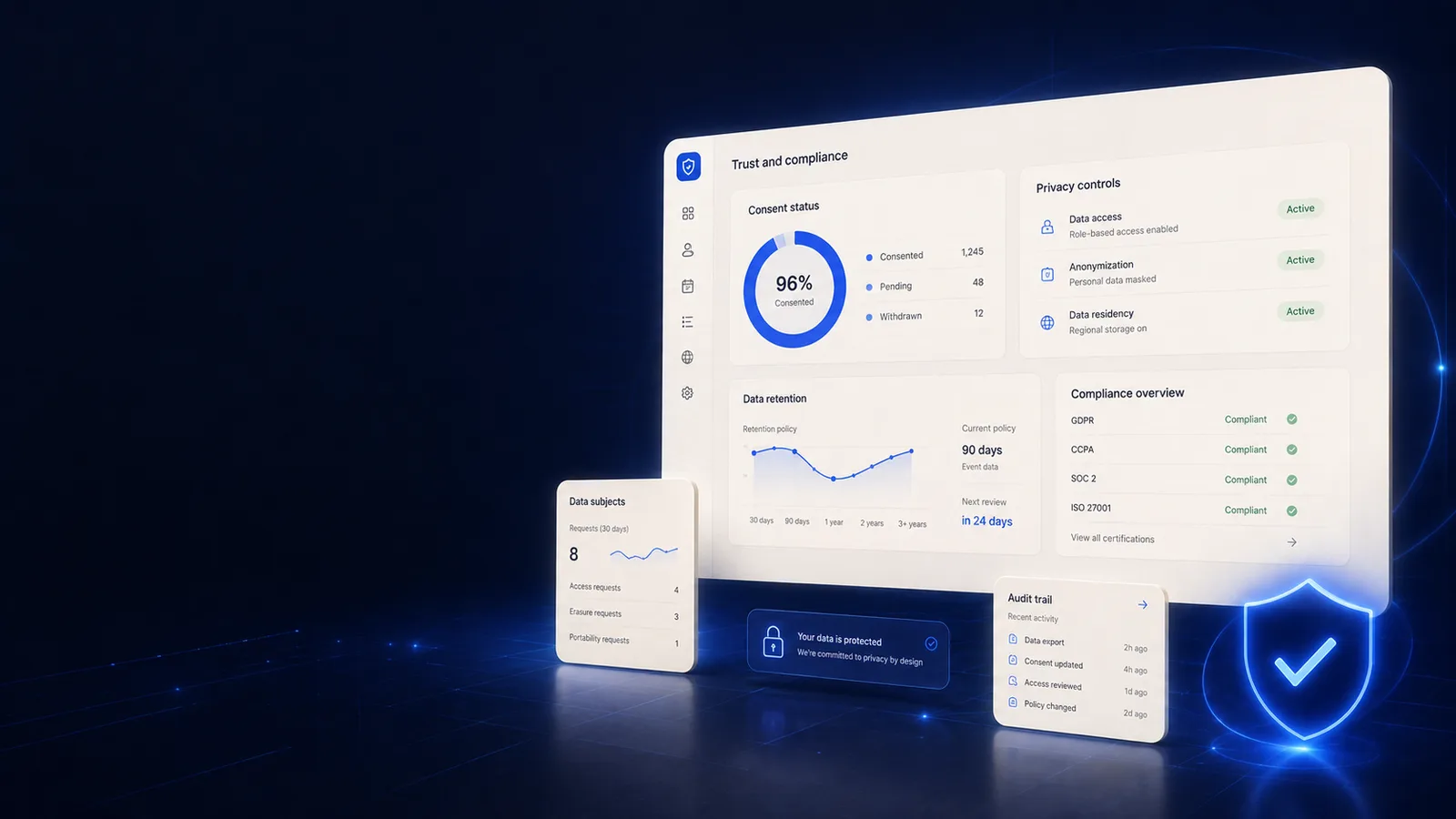
Trust & Compliance
Consent, appeals, and a log of every look
Pick one and the screen it lives on opens beside it, so you judge Trust and Compliance on what it puts in front of a manager rather than on a list of nouns.
How it works
Standing up a rollout that holds when somebody asks
- 1
Start from the jurisdiction
Notice, legal basis and consultation duties decide whether a rollout is lawful before a single agent is installed. Written guidance covers 32 jurisdictions: guidance, not legal advice.
- 2
Configure the narrowest scope
Capture policy per team and per region, with per-app deny-lists. A narrow scope is the cheapest defence there is: data you never collect cannot leak, and cannot be demanded.
- 3
Record consent and open the view
Consent is captured against a policy version, so who agreed to what, on which date, is a query. The transparency view answers the question before it turns into a complaint.
- 4
Keep the appeal route open
Disputes reach a human, every access lands on a hash chain, and the evidence pack assembles what an auditor or a tribunal asks for.
A policy document vs. controls that are actually wired in
workmonitor.vsPolicy-on-paper
6differences, worked through below
Consent
With WorkMonitor
A record naming the person, the date and the policy version. Producible on demand, and re-taken the moment the scope changes.
Policy-on-paper
A handbook clause, unversioned, impossible to produce for one person on one date.
What people were told
With WorkMonitor
A per-person view of what is collected, always open, so the question is answered before it reaches your HR lead.
Policy-on-paper
The tool was described at an all-hands, which is not evidence of anything.
Contesting a decision
With WorkMonitor
A dispute route with a right to human review, built for Article 22 and EU AI Act Article 26, so a challenged decision does not quietly become an unlawful one.
Policy-on-paper
Raise it with your manager. The person the data was collected for.
Over-broad capture
With WorkMonitor
Refused at capture time by the policy engine, with the change itself on the audit chain.
Policy-on-paper
Discovered in an audit, months after the setting changed.
Who accessed the data
With WorkMonitor
A hash-chained data-access log, so an allegation of misuse is settled with a record rather than an internal investigation.
Policy-on-paper
Unknown, and unknowable after the fact.
Operating in a new country
With WorkMonitor
Written guidance for 32 jurisdictions on what each regime expects of workplace monitoring.
Policy-on-paper
A legal review from scratch, or a rollout that quietly ignores the question.
Every capability in Trust & Compliance, and exactly where each one stands
- Consent management
- Employee transparency ("What We See")
- Capture controls / policy engine
- Scope Sentinel
Ask AI
Ask AI about your compliance posture
Consent records, access logs and policy state, answered in plain language. Evidence first: where there is no record behind a claim, there is no claim.
Pick a question above and WorkMonitor AI will answer from your team's real numbers.
By team
Who has to defend this
Use cases
What it is used to prove
Each one opens on the page written for that job — the same capabilities, read from the work rather than from the product.
- Monitor legally & stay compliantVersioned consent, a capture scope that cannot quietly widen, retention and DSAR handling, and written guidance for 32 jurisdictions before you roll out in one.
- Capture screenshots on your termsA randomised cadence, exclusions applied on the device, retention that expires, and the consent record and appeal route that keep the programme standing.
- Catch insider threats earlyEgress signals, anomaly detection and integrity checks on a hash-chained trail that records the investigators too, so the finding survives being examined.
Straight answers
The questions we would ask in your position
Every answer here is the one you would get on a call. Open as many as you like; they stay open, so two can be held side by side.
Enforced, which is the part that matters on the day somebody asks you to prove it. Consent management records who agreed to what, and the capture controls and policy engine translate that into what agents are allowed to collect at all. Scope Sentinel then checks continuously that real capture matches declared policy. The control is technical, not a PDF in a drawer.
With working machinery for the rights that decide whether a monitoring programme is lawful: disputes with a right to human review (GDPR Art. 22 / EU AI Act Art. 26), DSAR handling, erasure and retention policies, a data-access log, and bulk export for portability. WorkMonitor supplies the evidence and the controls; your DPO stays in charge of the programme.
Everything captured about them, through the "What We See" transparency view. Most European regimes expect exactly that, and it is also what keeps a rollout quiet: people who can see the record stop speculating about it. They can dispute an automated conclusion and reach a human reviewer, and anyone viewing their data leaves a trace in the access log.
The hash-chained audit log is live today: a tamper-evident record of consequential actions built on the same primitive as Proof Ledger, so "show me what changed and who changed it" is an export rather than a project. Compliance evidence packs, SIEM export and access-anomaly detection are built on top of it.
The product does, and that protects the company as much as anyone in it. Every access to employee data is written to the data-access log, the Watch-the-Watchers view makes it reviewable, and access-anomaly detection flags out-of-hours exports and cross-team browsing. A monitoring tool nobody audits is itself an insider risk.
Take these with you
The software is the easy part of a rollout
Here is what we would send a manager doing one for the first time: how to read a productivity number, what to say to a remote team before anything is installed, and a policy you can adopt as written.
Point it at one team for a week.
Create the account, put the agent on a handful of desks, and leave it alone. On Friday you read the week instead of reconstructing it: hours against their projects, focus and idle per person, and the timesheets already filled in.
Free for two seats. No card, and no sales call to sit through.