WorkMonitor is our best overall choice because it brings time, desktop and mobile activity, Copilot alerts, projects, timesheets and payments into one free platform. Hubstaff is better for field teams. Toggl Track is easier when people only need a timer. Harvest is stronger for client invoices. Deputy is built for shifts.
Why can an employee look busy all day and still finish the wrong thing?
It happens everywhere. Someone answers messages for hours but never reaches the important task. A new hire spends two days searching for an answer that a colleague knows by heart. Another person works late every night, yet nobody notices until they are exhausted.
A timer cannot explain any of that. It only says that eight hours passed.
The best employee time tracking software gives those hours context. It helps us see which project received the time, where work slowed down, who may need help and whether the final timesheet is ready for payroll. That does not mean staring at people all day. No manager has time for that. The useful tool is the one that notices the important change and brings it forward while there is still time to help.
Microsoft found that heavily interrupted workers can receive a meeting, email or chat notification every two minutes during core hours. In simple terms: a person may be active all day and still struggle to focus.
Source: Microsoft WorkLab, Breaking Down the Infinite Workday
Gallup reported global employee engagement at 20% in 2025. We do not need more dashboards that make work colder. We need clearer information that helps managers support people, recognize good work and fix problems earlier.
Source: Gallup, State of the Global Workplace 2026
In this guide, we compare 12 tools without pretending they all solve the same problem. We explain what each product does, where it helps and where it may be too much, or not enough.
Why would a company track employee time at all?
There are plenty of reasons, and it is not just about checking whether someone is working or scrolling through TikTok during office hours. Used properly, time tracking can reveal much smarter things: where projects lose time, which tasks create unnecessary delays, who may be overloaded, whether deadlines are realistic, and which processes need to be fixed.
Here are a few of the most useful reasons:
Helping managers see the full picture
Let us start with a normal Monday. A manager asks, “How is the project going?” The employee says, “Good.” Nothing sounds wrong. On Friday, the task is still not finished. What happened? Maybe the instructions were unclear. Maybe meetings kept interrupting the work. Maybe the employee used the wrong tool. Maybe they simply did not give the task enough time.
Without context, the manager guesses. And good software reduces the guessing.
For a five-person company, one role going badly can affect the whole business. For a 500-person company, the problem is different: there is too much information for any manager to read. Both companies need the same thing: a simple way to see what deserves attention.
Tracking should help us ask a better question, not jump to a faster accusation.
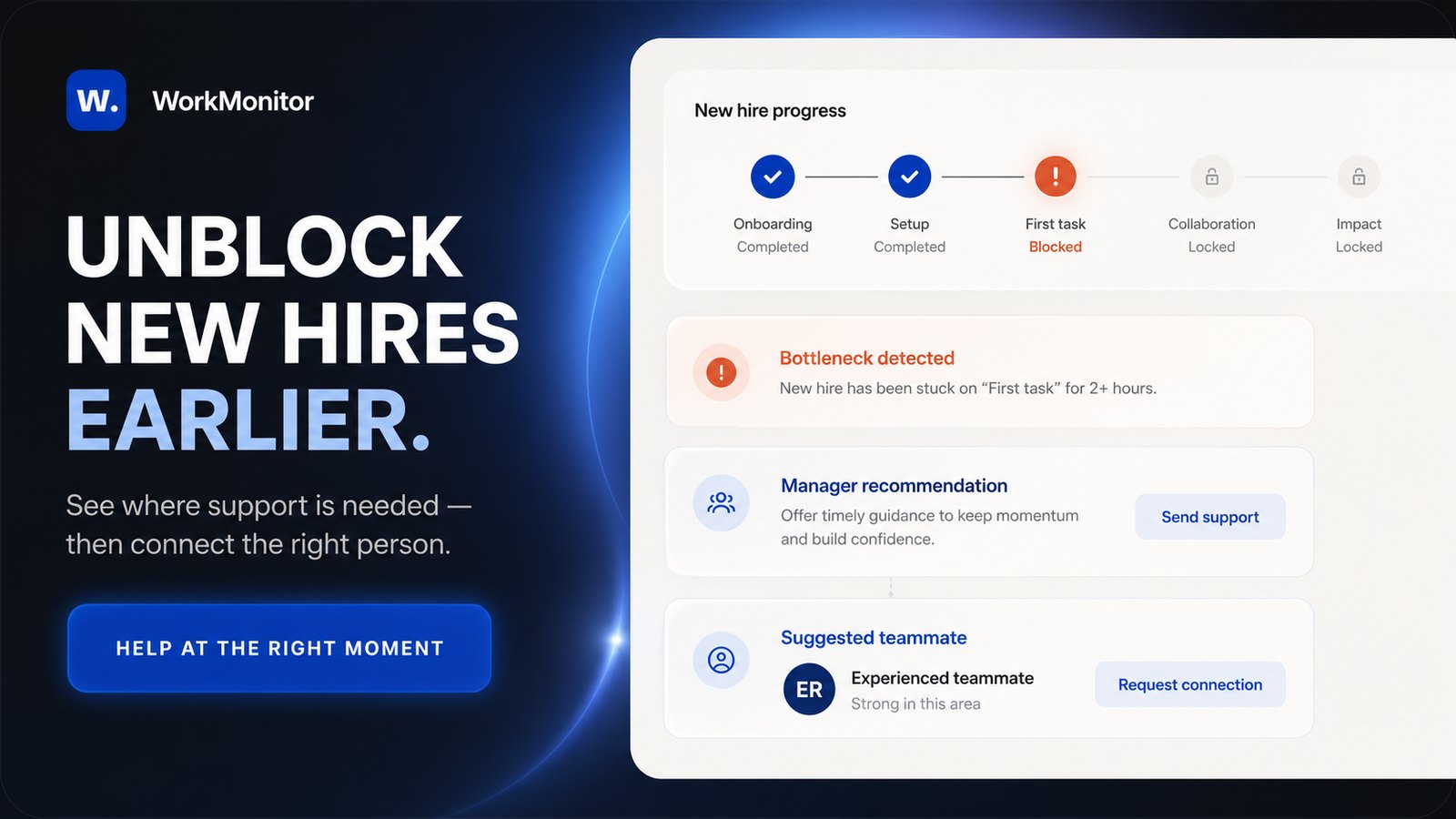
Spotting new hire bottlenecks early
A new employee wants to look capable. Even when we say, “Ask whenever you need help,” they may stay quiet. It is not because they want to waste time. They are new. They want to prove that hiring them was the right decision. Imagine now that this new employee spent four days trying to fix one problem. A senior colleague could solve it in ten minutes, but nobody knows help is needed.
A useful work pattern can reveal that the person keeps returning to the same task, changes tools constantly or works unusually late. The manager can then ask a simple question: “Is anything blocking you?”
That small conversation can save days and protect the new employee’s confidence.
Recognizing contributions that often go unnoticed
Most people hear “tracking” and think about “finding mistakes”. That is only half the story.
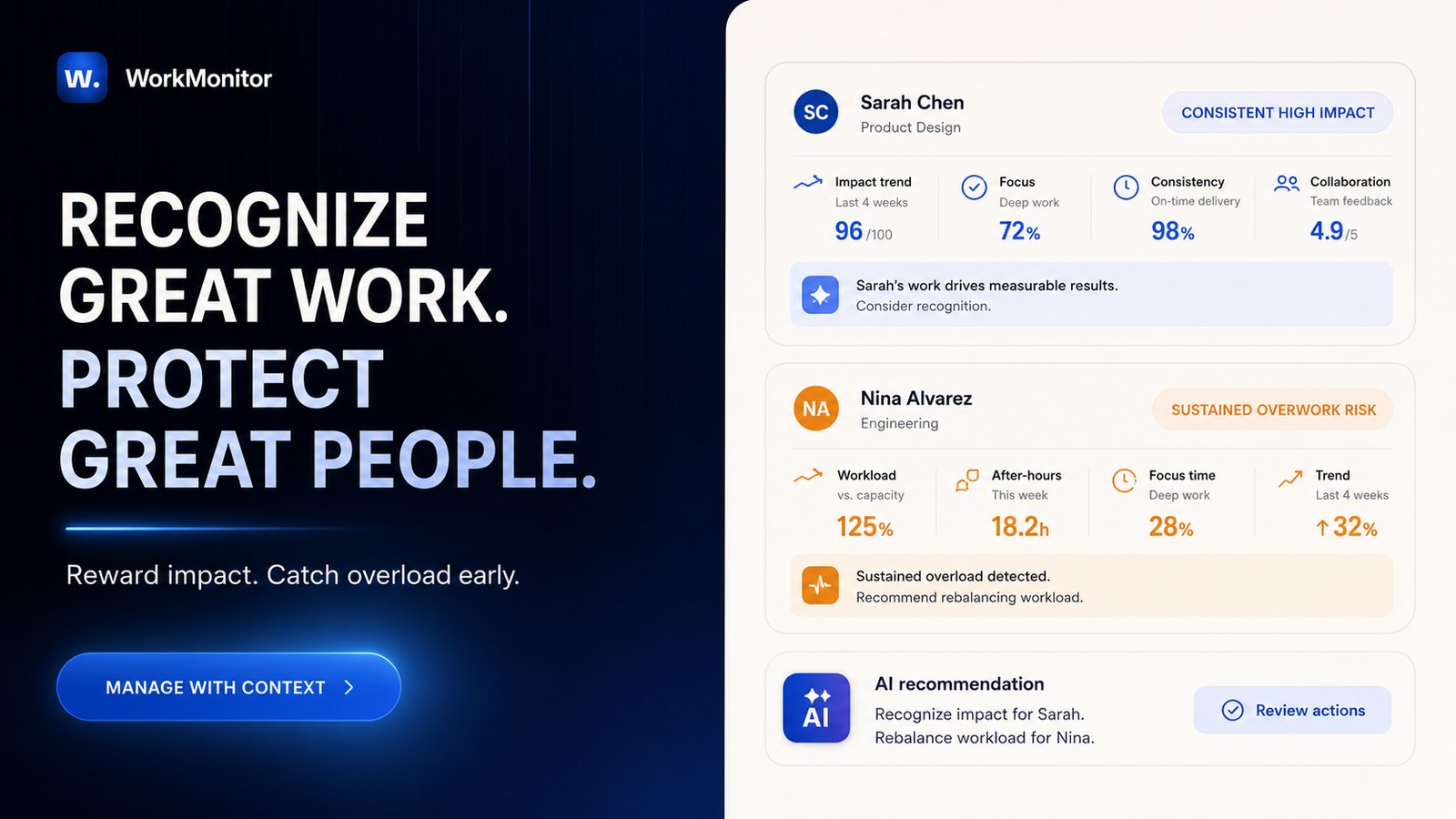
Quiet employees are often overlooked. They may deliver difficult work without sending ten messages about it. Another person may look more visible simply because they speak more. Work data gives the manager another piece of the picture. It can show steady delivery, focused project time and a difficult workload handled well. It should not calculate a bonus automatically, but it can remind a manager to recognize work that might otherwise stay invisible.
It can also show when a strong employee is carrying too much. Working late for one evening may be normal. Doing it every night for three weeks is worth a conversation. Software cannot diagnose burnout. It can simply tell us, “This pattern changed. Please look.”
Making rewards and evaluations fairer
Without reliable context, managers can sometimes reward the wrong behavior.
Imagine that one employee appears busy, knows how to stay visible and produces impressive-looking activity numbers, but completes very little meaningful work. Meanwhile, another employee quietly carries difficult projects, helps colleagues and consistently meets deadlines. At the end of the quarter, the first employee receives a bonus because their activity looked good. The second receives nothing.
The rest of the team will notice. When employees see that visible activity matters more than genuine contribution, trust disappears quickly. Strong workers begin to wonder why they are making so much effort when the company cannot see the difference.
Monitoring data should never decide who deserves a bonus by itself. But it can give managers better evidence and help them compare activity with actual results. The purpose is not to reward whoever moves their mouse the most. It is to understand who is contributing, who needs support and whether recognition is being distributed fairly.
Identifying poor work habits before they become normal
Sometimes the problem is not a blocked employee or an unclear process. Sometimes an employee is regularly avoiding their responsibilities, spending large parts of the workday on unrelated activities or doing far less work than the role requires. Companies should not pretend this never happens. And the longer the behavior continues without intervention, the harder it becomes to correct. A problem that lasts for two days may require a simple conversation. A pattern that continues for six months can become the employee’s normal way of working.
By then, the manager may feel that it is already too late. The habit is established, projects have suffered and the rest of the team may already be compensating for it. One neglected problem can also influence others. When employees see that poor performance has no consequences, standards can gradually fall across the team.
This is why managers need to notice meaningful changes while they are happening, not six months later in an old report. Early visibility allows the manager to say:
“I noticed something has changed. What is happening, and how can we fix it?”
That is a much healthier conversation than discovering half a year later that an employee has barely contributed to a critical project.
One trusted login can cost millions
A trusted login can do more damage than a failed one.
In January 2026, a former Google engineer was convicted of stealing more than 2,000 pages of confidential AI technology using access he already had. Three months earlier, a former general manager at a U.S. defense contractor pleaded guilty to selling protected cyber technology. The U.S. Department of Justice said the theft cost the company more than $35 million.
Sources: U.S. Department of Justice, Google trade-secret conviction, January 30, 2026 and U.S. Department of Justice, defense-contractor guilty plea, October 29, 2025
The account holder does not even need malicious intent. Verizon’s 2026 research found that mobile-centered social-engineering attacks achieved a 40% higher success rate than traditional email phishing.
Source: Verizon, 2026 Data Breach Investigations Report
Delayed discovery makes the damage worse. IBM estimated the average data-breach cost at $4.44 million globally in 2025 and a record $10.22 million in the United States. Organizations still needed an average of 241 days to identify and contain an incident.
Source: IBM, Cost of a Data Breach Report 2025
No time tracker can prevent this alone. Companies still need controlled access, multifactor authentication, endpoint protection, data-loss prevention, backups, training and an incident-response plan.
WorkMonitor adds work-hour context. Applications, websites, screenshots and activity records can help an authorized reviewer see whether personal cloud storage was opened, a large export appeared or the applications being used suddenly changed.
That evidence does not prove theft. It shows where to investigate.
CISA recommends logging and monitoring business systems for the same practical reason: teams respond faster when they can see who accessed or changed information.
Source: CISA, Use Logging on Business Systems
The response should be fast, but human: preserve the evidence, compare it with identity and security logs, check the person’s role and instructions, then let an authorized reviewer decide.
The goal is not to suspect everyone. It is to avoid discovering a preventable crisis 241 days too late.
Why is trust alone not a security strategy
Some tools promote themselves by emphasizing that they avoid screenshots or collect very little detail. That can sound reassuring, especially for companies concerned about privacy.
But privacy-friendly monitoring still needs to provide enough visibility to be useful. Leaving the keys to a car in the middle of the street and saying, “We trust that nobody will take it,” is not a security system. In the same way, giving employees access to valuable company information without any reasonable oversight does not create trust. It simply creates an opportunity that may never be noticed if something goes wrong.
The answer is not maximum surveillance. The answer is proportionate monitoring: collect only what is necessary, explain clearly what is being monitored, protect the collected data and use alerts to identify meaningful risks rather than watching every small action.
A good monitoring system should protect both sides. It should protect the company from serious misconduct while also protecting employees from unfair assumptions by providing context and evidence.
Now that you’re probably convinced your team could benefit from employee monitoring software, let’s look at what already exists, and the biggest problem with most tools on the market.
Find the right employee time tracking software for your team
Answer five quick questions about how your team actually works, and we'll put together a short read-out of your situation and what would help most.
Which time tracking approach actually fits your company?
Five short questions, about thirty seconds. At the end you'll get a short, specific read-out of your situation, not a generic checklist.
Start the quizThe problem with traditional employee monitoring tools
Many tracking products give us screenshots, URLs, activity percentages, reports and exports. That sounds useful until a manager opens the dashboard and sees 20,000 events.
Nobody is going to read all of them.
The real problem is not a lack of data. It is that most tools leave the manager alone to understand what the data means. When the manager is busy, the analysis gets postponed. A week becomes a month, and a month can easily become six months.
By the time the problem is finally noticed, it may already be deeply established. An employee might have been blocked on the same project for months, struggling with an inefficient process or slowly becoming disengaged. The manager did not ignore the problem intentionally, they simply never received a clear warning.
At that point, the conversation becomes much harder. A small issue that could have been solved quickly has become part of the employee’s normal routine. And when one unresolved problem is allowed to continue, it can eventually affect deadlines, clients and the rest of the team.
It can also create unfair situations. Imagine that one employee learns how to make their activity look good without producing much meaningful work. At the end of the quarter, that person receives a bonus, while colleagues who genuinely carried the workload receive nothing.
Those employees will notice. And once people feel that effort is not being recognized fairly, motivation and trust can disappear very quickly.
Now that you have a clearer understanding of why employee monitoring software exists, and why companies have relied on it for years now, you may be considering introducing one to your own team.
But choosing the right platform is not easy. Some tools focus on time tracking, others on screenshots, productivity analytics, security, payroll or remote-team management.
To make that decision easier, we analyzed 12 of the most popular employee monitoring platforms, comparing their features, strengths, limitations and ideal use cases. Here are the best options to help you find the software that fits your team.
Best employee time tracking software for 2026: the 12-tool shortlist
| Rank | Software | Best for | Main advantage | Main limitation |
|---|---|---|---|---|
| 1 | w.WorkMonitor | Integrated management for employees & freelancers | Free Copilot, alerts, desktop/mobile visibility, customization, payout workflow | Granular monitoring requires careful governance |
| 2 |  Hubstaff Hubstaff | Remote and field teams | Mature GPS, time, activity, projects and payroll ecosystem | Advanced insights and packaging increase cost |
| 3 |  Time Doctor Time Doctor | Detailed distributed-work analytics | Unusual-activity reports, notifications and mature monitoring | Advanced controls sit in higher plans |
| 4 |  ActivTrak ActivTrak | Enterprise work intelligence | Work Advisor, workload balance, benchmarks, AI adoption | AI assistant was Early Access; packages vary |
| 5 |  Insightful Insightful | Configurable monitoring and alerts | Raw activity, alerts, screenshots, AI-tool visibility | Requires formal access and privacy configuration |
| 6 |  Teramind Teramind | Insider risk and DLP | Behavior rules, real-time alerts, automated responses | More complex and intrusive than normal time tracking |
| 7 |  Toggl Track Toggl Track | Simple professional time tracking | Excellent adoption, billing, privacy-first design | No manager-visible screenshots or app monitoring |
| 8 |  Clockify Clockify | Low-cost basic timekeeping | Accessible timer, timesheets, paid upgrades | Advanced workflow requires paid plans |
| 9 |  Harvest Harvest | Agency invoicing and margin | Time, invoices, budgets, accounting workflow | Limited workforce-monitoring context |
| 10 |  TimeCamp TimeCamp | Automatic time reconstruction | Automatic tracking and broad timesheet functions | Managers still need to interpret the data |
| 11 |  Deputy Deputy | Shift and deskless teams | Scheduling, attendance and payroll connections | Not designed for computer-work intelligence |
| 12 |  Jibble Jibble | Simple attendance | Mobile, kiosk and location-based clocking | Limited desktop-work and project context |
Competitor packaging and prices can change. WorkMonitor capabilities are based on the 2026 product brief and interface. Verify security, data residency, platform support and roadmap items before deployment.
How this comparison was put together
Every product in this comparison was installed and used, not judged from a marketing page. We ran real projects through each tracker and checked how it behaved for three different people: the manager reading the reports, the employee being tracked and the administrator configuring it. A tool that looks clean in a demo can feel very different after two weeks of real timesheets, approvals and alerts.
Rankings follow the criteria described throughout this guide: pricing transparency, employee experience, accuracy of the data, quality of alerts and how much manual review each tool still requires. No vendor paid for a position, and links to competitors are included so readers can verify every claim themselves.
Prices, plans and roadmaps change often in this market. Where we could not confirm something directly inside the product, we said so instead of guessing, and we recommend re-checking pricing pages and security documentation before any deployment.
WorkMonitor: best overall employee time tracking software
Best overall integrated workforce-management choice
Most time trackers begin with a timer. WorkMonitor begins with a management question: what does the manager actually need to know today?
That difference matters. A manager does not need 300 screenshots just because the software can take them. They need to know that a new employee may be blocked, that a normally reliable person has suddenly changed their work pattern, that one project is consuming far more time than expected, or that a high performer has been working late for three weeks.
What WorkMonitor brings together
WorkMonitor connects time tracking, desktop and mobile activity, projects, screenshots, workload signals, timesheets, payment reviews and Copilot alerts.
In practice, that means we do not have to open one tool for time, another for screenshots, a spreadsheet for payroll and a separate dashboard for productivity. The information lives in one place and can be followed from the workday to the final payment.
The mobile part is especially useful. Imagine a salesperson who spends half the day making calls, a social media manager working from a phone, or a field employee moving between locations. A desktop-only tracker may make that person look inactive even while they are working. WorkMonitor is designed to include mobile activity in the wider picture.
The Copilot is the real difference
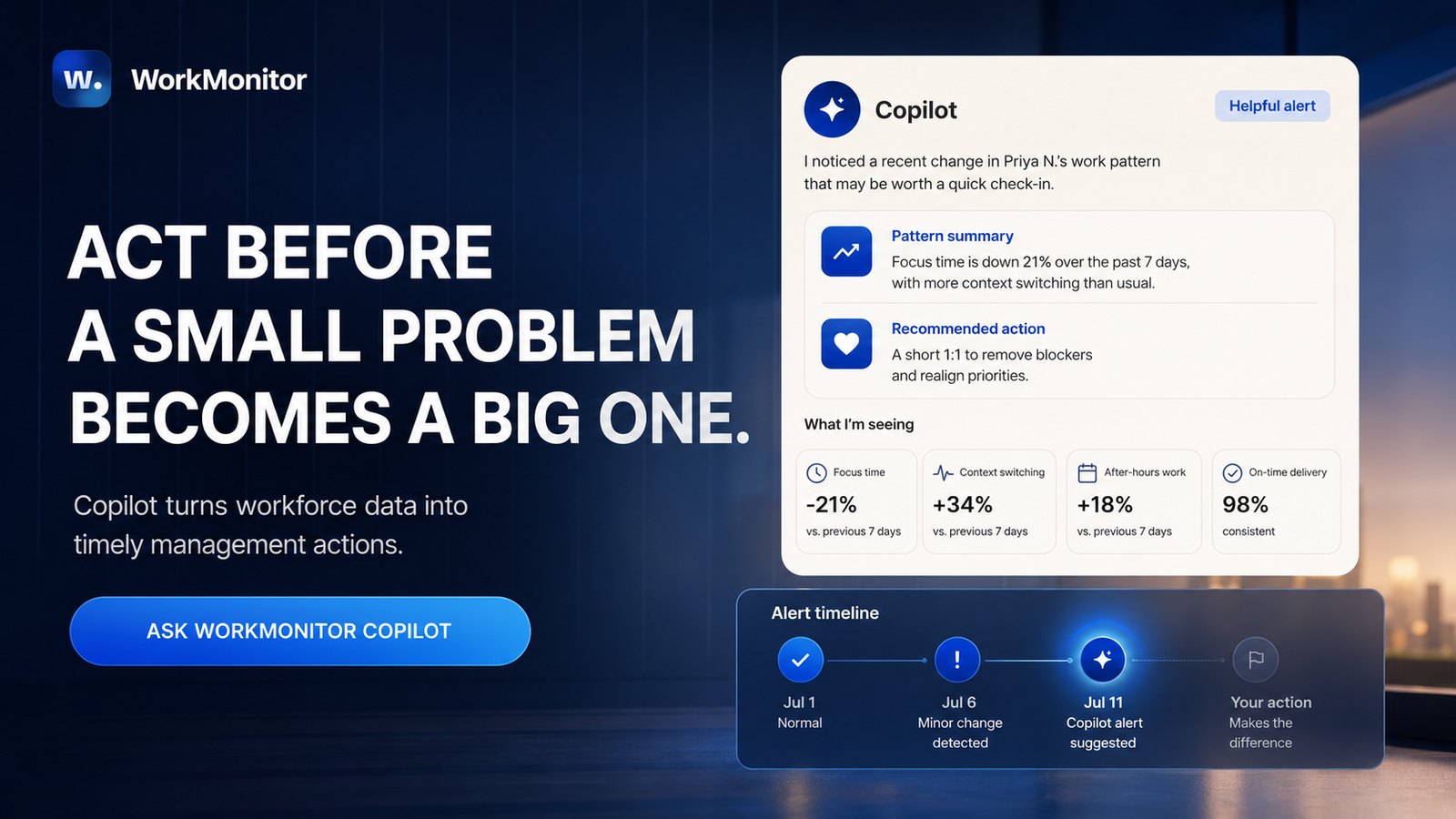
Other tools often give us data and leave us alone with it. WorkMonitor Copilot is designed to explain what deserves attention.
For example, instead of showing a manager a long activity graph, it can surface a simpler message: a new hire has spent an unusual amount of time in the same workflow; one employee's after-hours work has increased; a project is using more time than planned; or a work pattern changed suddenly.
The manager still decides what to do. The Copilot does not know whether the person had a difficult client call, a family emergency or a technical problem. It gives the manager a reason to ask.
That is the useful balance: enough detail to understand what happened, without expecting managers to watch everybody all day.
From work to payment
Tracking time is easy. Paying correctly is where companies often lose time.
The manager exports a file. Finance checks it. Someone notices a wrong rate. The employee corrects a timesheet. A new export is created. Then the payment provider needs another format.
WorkMonitor is designed to shorten that chain. Its supplied interface shows approved and locked timesheets moving into a Wise payout review. The manager can see who finalized the batch, review unusual amounts and trace each payment line back to its source.
Wise is the payment connection demonstrated in the supplied interface. Revolut, cryptocurrency payments and additional banking connections should be treated as roadmap items until they are live and documented.
An internal workspace, not a random tracking brand
WorkMonitor can be adapted to the company's colors and placed on the company's own URL.
This may sound cosmetic, but employees notice the difference. Opening a platform called "WorkMonitor" on an unrelated address can feel like the company bought a tool specifically to watch them. Opening a familiar workspace under the company's domain feels more like using an internal system for projects, hours, support and payment.
The company should still explain what is tracked. Branding is not a way to hide monitoring. It simply makes the daily experience more coherent and less hostile.
Fast login helps too. The supplied interface shows passwordless email, password, Google and SSO options. Employees do not need another complicated account just to start the day.
Who should choose WorkMonitor?
WorkMonitor makes the most sense for remote teams, software companies, agencies, BPOs, support teams and businesses that work with both employees and freelancers.
It is also attractive to small companies. One employee problem can be very expensive when the team only has five people, and WorkMonitor is completely free.
A company that only needs a basic timer may not need all this visibility. But when management, screenshots, mobile work, projects, alerts and payments all matter, WorkMonitor offers the most complete combination in this comparison.
WorkMonitor is completely free
The full platform, Copilot, mobile and desktop tracking, screenshots, timesheets and payout traceability, at no seat cost.
Hubstaff: best for field and mixed-location teams
Best for remote and field teams
Hubstaff is one of the better-known names in time tracking. It combines timers, activity levels, optional screenshots, apps and URLs, projects, budgets, payments and GPS features.
The GPS side is where Hubstaff stands out. If employees visit customer locations, construction sites or delivery areas, geofencing can help clock people in and out automatically. A normal office tracker is not built for that.
- Supports Windows, macOS, Linux, Android and iOS
- Configurable screenshots, app/URL tracking and permissions
- Large integration ecosystem for payroll and accounting
- Many plans and add-ons; features shown may sit in a higher tier
- Advanced Insights and payroll connections raise the final cost
- Mobile apps don't support screenshots, per Hubstaff's own documentation
Sources: Hubstaff, How Tracking Works · Hubstaff official pricing
Time Doctor: best for mature remote-work monitoring
Best for detailed distributed-work analytics
Time Doctor is built for distributed computer-based teams. It tracks time, applications, websites, activity, attendance and optional screenshots. Higher plans add real-time notifications, unusual-activity reports, video screen recording and SSO.
- Flags irregular keyboard/mouse patterns and tools designed to fake activity
- Distraction alerts for time spent on classified sites
- The most useful intelligence sits in higher plans
- Managers still move between reports to piece the story together
Sources: Time Doctor premium features · Time Doctor unusual activity report
ActivTrak: best for established workforce intelligence
Best established work-intelligence alternative
ActivTrak is closer to workforce analytics than a classic timer. It looks at work patterns, focus, workload, application use, schedules, location policies and AI adoption. Its Work Advisor lets managers ask questions in normal language: which team appears overloaded, where did focus time fall, are people using the AI tools the company pays for.
- Strong at company-wide trends and capacity planning
- Compares teams and identifies over/underutilization
- Work Advisor was still described as Early Access in June 2026
- 2026 packaging separates workforce management, productivity and other capabilities
- Not built around a free daily-activity-to-payment workflow
Sources: ActivTrak official platform · Work Advisor Early Access docs
Insightful: best for configurable activity monitoring
Best for configurable monitoring and alerts
Insightful records applications, websites, time, activity and screenshots. It can run automatically on company computers and offers alerts based on productivity levels or unwanted activity, plus reporting on which AI tools employees use.
- Detailed admin controls: managers limited to their own teams
- Privacy rules can exclude or blur selected apps and sites
- Detailed control means detailed setup
- Poor configuration can create noise or expose unnecessary information
Sources: Insightful employee monitoring · Insightful privacy controls
Teramind: best for insider threats and data-loss prevention
Best for dedicated insider-risk & DLP
Teramind is the security specialist in this list. It can monitor applications, websites, emails, files and other endpoint activity. Its rules can trigger alerts and, in some configurations, warn, block or lock a user. This is much deeper than normal time tracking.
- Rules can alert security teams and potentially stop an action in progress
- Useful for banks, healthcare and IP-heavy businesses
- Can be too heavy for onboarding, time records and manager support alone
- Requires specialist configuration and legal review
Sources: Teramind user activity monitoring · Teramind rules guide
Toggl Track: best when a simple timer is enough
Best for simple adoption & professional services
Toggl Track does not support manager-visible screenshots or application monitoring. Employees track their own time and decide what becomes part of the timesheet. For trusted professional teams, this can be exactly what is needed.
- Easy to learn, good project reporting, less resistance from teams
- Works well for freelancers, agencies and consultancies
- No context if a project is stuck, since it intentionally doesn't collect it
- No context for onboarding, client proof or internal risk
Sources: Toggl Track automated time tracker · Toggl Track screenshot policy
Clockify: best for basic low-cost timekeeping
Best low-cost starting point
Clockify is a familiar starting point for small teams: timers, timesheets, calendars and kiosks, with approvals, invoicing, attendance and other controls on paid plans.
Source: Clockify official pricing
Harvest: best for agencies and client invoices
Best for turning project time into invoices
Harvest focuses on time, budgets, invoices and project profitability, not on becoming a deep employee-monitoring platform. If the main question is "did we bill enough for this project?", Harvest gives a clear answer.
Source: Harvest official pricing
TimeCamp: best for rebuilding the day automatically
Best for automatic & AI-assisted timesheets
TimeCamp helps people who forget timers by using computer activity to reconstruct time and connect it to projects, attendance, billing and invoicing. Automatic records reduce the Friday-afternoon problem of trying to remember what happened on Monday, but an open application doesn't prove useful work happened, so managers still need a review process.
Source: TimeCamp official pricing and features
Deputy: best for shifts, restaurants and retail
Best for scheduling & deskless teams
Deputy is designed around schedules, clock-ins, breaks and attendance. It answers a different question from desktop monitoring: did the employee arrive for the assigned shift? That makes it practical for restaurants, shops, healthcare teams and other shared-location workplaces, though it won't explain how a remote software employee spent the day.
Source: Deputy official pricing
Jibble: best for straightforward attendance
Best for straightforward attendance tracking
Jibble focuses on clocking in and out through mobile devices, kiosks and location features. It's simple and practical for field workers and shared workplaces, but offers much less context about computer work, project bottlenecks or manager coaching.
Source: Jibble official website
Which tool should your company actually choose?
We can make the decision easier by starting with the problem instead of the feature list.
- If employees work in the field and GPS matters, start with Hubstaff.
- If a large company wants organization-wide workforce analytics, look at ActivTrak.
- If insider threats and DLP are the priority, Teramind is the specialist.
- If people only need a clean timer, Toggl Track or Clockify may be enough.
- If client invoices are the main concern, Harvest is a strong choice.
- If the business runs on shifts, compare Deputy and Jibble.
- If you need time, detailed work context, Copilot alerts, mobile visibility, employees, freelancers, branding and payment in one free platform, WorkMonitor is the strongest overall fit.
The important word is need. More monitoring is not automatically better. Less monitoring is not automatically more ethical. The correct level depends on the risk, the work and the decision the manager needs to make.
Mobile work can completely change the result
A desktop tracker may tell us that an employee was inactive for two hours. But what if that person spent those two hours calling customers from a phone?
This is a common problem for salespeople, community managers, field employees and anyone who works across devices. Hubstaff, Toggl Track, Time Doctor, Deputy and Jibble provide mobile apps, but the purpose differs: some focus on the timer, others on GPS or attendance. Hubstaff's own documentation says its mobile apps do not take screenshots.
WorkMonitor is designed to bring mobile work into the same workforce picture as desktop activity, projects and workload, which can prevent a manager from judging an employee using only half of the workday.
Mobile tracking needs careful rules. Personal phones contain personal information, so companies should define whether the device is corporate or personal, which working hours apply and what information is actually necessary.
Sources: Hubstaff screenshot platform documentation · Toggl Track mobile app
Why time tracking should connect directly to payment
Let us imagine a freelancer worked 73 hours this month. The tracker contains the hours. The project tool contains the tasks. A spreadsheet contains the rate. Finance uses another system to pay. One wrong copy-and-paste can change the amount.
This is why approval matters. Raw activity should not become money automatically. A safer workflow is simple:
- Work is tracked against the correct project.
- The employee or freelancer reviews the record.
- The manager corrects exceptions.
- The timesheet is approved and locked.
- Finance reviews unusual rates or amounts.
- The final payment remains linked to the source hours.
WorkMonitor's supplied interface follows this logic. It shows approved and locked timesheets, identifies who finalized the batch and offers review, dry-run and live modes for a Wise payout.
Good automation lets us follow the evidence. Bad automation simply makes the mistake happen faster.
Screenshots: helpful context or too much?
Both answers can be true. A screenshot can show that a new employee is using the wrong system, confirm work for a client, or explain why an activity alert appeared. It can also capture a password, customer information, a private message or health data.
Before enabling screenshots, ask:
- What problem are we trying to solve?
- Could time and project data answer it without an image?
- Who can open the screenshot?
- How long will it be kept?
- Can we blur or exclude sensitive applications?
- Does opening the image leave an access record?
WorkMonitor's supplied interface includes capture policies and records of who viewed an image. Hubstaff offers blur and frequency controls. Insightful can exclude selected apps and websites.
A screenshot is one moment. It should never become a complete performance review.
Source: ICO, Employee Monitoring: Is It Right for Your Business?
What monitoring can, and cannot, do for security
Monitoring can help notice unusual access, file transfers, unapproved AI tools or behavior that does not match a person's role. It cannot replace endpoint protection, identity security, backups, DLP, employee training or an incident-response plan.
Think of it like a smoke alarm. The alarm can tell us something unusual is happening. It cannot explain the entire fire or rebuild the room.
WorkMonitor can provide an early operational alert and the evidence needed for review. Insightful and Time Doctor also provide unusual-activity signals. Teramind goes further with security rules and automated responses. The correct response depends on the situation: an unusual download may be theft, a legitimate backup, or a person following the wrong instructions. We investigate first.
Is employee time tracking legal?
Often, yes, but the rules depend on the country, state, type of employee, device and information collected.
In the United States, the Fair Labor Standards Act requires employers to keep accurate records for covered non-exempt workers, including daily and weekly hours.
Source: U.S. Department of Labor, FLSA recordkeeping
In the European Union, time, application and screenshot records are personal data. Companies need a lawful basis, a defined purpose, security, accuracy and an appropriate retention period. Employee consent is not always enough, because an employee may not feel free to refuse.
Source: Official GDPR, Regulation (EU) 2016/679
The simple rule is this: do not install first and explain later. Tell employees when tracking runs, what it records, who can see it, why the company needs it and how a mistake can be corrected. Then ask local legal counsel to review the policy.
How much should employee time tracking software cost?
WorkMonitor costs $0 and is completely free.
Competitors normally charge per user, per month. The exact number matters less than the plan containing the feature we need. A cheap timer can become expensive if approvals, screenshots, SSO, payroll or useful analytics require upgrades.
For a 50-person team, a difference of $5 per employee becomes $3,000 every year. But software cost is only one part of the calculation.
We should also count:
- Time spent implementing the tool.
- Manager hours spent reviewing reports.
- Add-ons and paid integrations.
- Payroll or payment fees.
- Time spent correcting bad records.
- The cost of missing an important problem for months.
The cheapest subscription is not always the cheapest system. WorkMonitor's advantage is that the complete platform is free, while the internal work of setting policies and training managers still remains.
A simple buyer checklist
Before booking demonstrations, answer these questions:
- Do we need a timer, automatic tracking or both?
- Do employees work on desktop, mobile or in the field?
- Are screenshots truly necessary?
- Do we need alerts, or only reports?
- Can the tool distinguish projects and clients?
- Can employees correct a wrong record?
- Who approves and locks the timesheet?
- Does time connect to payroll, payouts or invoices?
- Who can see screenshots and activity?
- Where is the data stored, and how long is it retained?
- Can the platform use our company colors and URL?
- Is SSO included?
- What is the real annual cost?
Then ask every vendor to show one complete situation: a new employee starts a project, becomes blocked, receives support, corrects the timesheet and appears in a payment review. If the vendor cannot show the whole journey, the company will probably fill the gaps with spreadsheets.
How to introduce tracking without damaging the team
Explain the real reason
"We need visibility" is vague. "We want to find project blockers earlier and make payroll more accurate" is easier to understand.
Show the employee experience
Do not only demonstrate the administrative dashboard. Show employees what runs on their device, when it runs, which information the company can see and how that information is used.
Give employees a practical way to review data about them, add missing context, correct an inaccurate timesheet or project assignment and challenge a record that does not reflect what happened. They should also know how to report a screenshot that captured a private conversation, password, health information or anything unrelated to work.
Do not promise a self-service delete button unless the product and company policy actually provide one. Define who reviews these requests, how access to the image is restricted, when private or irrelevant content is deleted, what must be retained for a legitimate legal reason and how the outcome is communicated. This does not stop automatic visibility during defined work hours. It gives employees a real correction and escalation path when the collected data is inaccurate, private or irrelevant.
Start with clear working hours
Monitoring should not silently continue into personal time. Define the schedule and explain exceptions.
Train managers before giving them access
A low activity score is not proof of poor work. Reading, planning, calls and meetings may produce little keyboard activity. A manager who does not understand that can misuse perfectly accurate data.
Use alerts while there is still time to correct the problem
Without a useful alert, a repeated problem can continue unnoticed until a review six months later. By then, the behavior may have become normal, projects may have suffered, colleagues may have spent months compensating and the company may have lost much of what it invested in recruitment, onboarding, training, equipment and salary.
WorkMonitor Copilot brings a meaningful change forward while the evidence is still recent. The reviewer can check what happened, speak with the employee, distinguish a blocker or training gap from repeated avoidance, agree on the expected correction and follow up.
When the behavior is genuinely poor, that early conversation gives the employee a real opportunity to correct it before the situation becomes disciplinary or irreversible. When the cause is missing access, unclear instructions, overload or a broken process, the company can fix the actual problem. In both cases, acting early protects the employee’s chance to succeed and the company’s investment in that person.
The alert provides the signal and supporting evidence. A human reviews the context, conducts the conversation and decides the next step.
Review the system after one month
Ask whether payroll errors fell, managers acted faster and employees understood the rules. Remove data that nobody uses.
Frequently asked questions
What is the best employee time tracking software in 2026?
WorkMonitor is our best overall choice for companies that need more than a timer. It combines desktop and mobile activity, projects, screenshots, Copilot alerts, timesheets, company branding and a path to payment in one free platform. Hubstaff is a better fit for field teams that need GPS and geofencing. ActivTrak is strong for enterprise workforce analytics. Teramind is designed for serious insider-risk and data-loss-prevention requirements. Toggl Track works well when trusted professionals only need simple time and billing. The best choice depends on the question you're trying to answer: for "how many hours did this project use," a lightweight timer is enough; for "what changed, who may need help, and how does approved work reach payment," WorkMonitor is the stronger fit.
What is employee time tracking software?
Employee time tracking software records when people work and usually connects those hours to a project, task, shift or client. A simple tool offers a start-and-stop timer; more advanced software can create timesheets automatically, track apps and websites, capture screenshots, record attendance, measure project cost and prepare payroll. Time tracking is not the same as performance management: eight tracked hours do not tell us whether the work was correct, difficult or valuable. The best systems also allow corrections, since a timer may continue during lunch or assign work to the wrong project.
Can employee time tracking software take screenshots?
Yes. WorkMonitor, Hubstaff, Time Doctor, Insightful, TimeCamp and Teramind can support screenshot or screen-monitoring features. Screenshots can help verify remote client work, understand a blocked workflow, or provide context for an alert, but they can also capture sensitive information. Companies should define why screenshots are needed, who can view them and how long they're stored; blurring or excluding certain applications can reduce risk. WorkMonitor's supplied interface includes capture policies and access records showing who opened a screenshot, which helps with accountability but doesn't remove the employer's legal responsibilities. If time, projects and results already answer the business question, screenshots may not be necessary.
Is employee time tracking legal?
Employee time tracking is often legal, but rules vary by location and the type of information collected. Recording working hours is different from capturing screenshots, location, communications or biometric data. In Europe, monitoring data falls under the GDPR, requiring a lawful purpose, transparency, security and appropriate retention; some countries require consulting employee representatives or works councils. In the United States, federal and state rules can differ, and wage laws may require accurate hour records while privacy and electronic-communications rules add other obligations. Employers should provide clear notice before installation and get local legal advice, since a software vendor cannot decide whether a specific configuration is lawful for every company.
How does time tracking connect to payroll?
The safe workflow begins with tracked time and ends with approved time: hours belong to a date, person, project and rate; the employee or manager corrects errors; a manager approves and locks the timesheet; only then should final lines move to payroll or a payout provider. WorkMonitor's supplied interface demonstrates this through a Wise payout review, identifying who finalized the batch, confirming timesheets are approved and locked, and highlighting unusual payment situations. This is safer than paying directly from raw activity, since a tracker may record lunch, assign work to the wrong project, or continue after the employee finished, so human review remains necessary.
What is the best free employee time tracking software?
WorkMonitor is our strongest free option because the complete platform is free and includes far more than a basic timer: detailed work visibility, desktop and mobile activity, screenshots, projects, Copilot alerts, timesheets, custom branding and payment review. That makes it different from free entry plans that limit team size or reserve important workflows for paid tiers. Clockify and Toggl Track remain good free choices when a team wants lighter tracking, and a freelancer who only needs project hours may prefer their simpler experience. The trade-off is monitoring depth: WorkMonitor collects more detailed work information, so companies must define schedules, access and retention carefully.
Is automatic tracking better than manual timesheets?
Automatic tracking is better at remembering. Manual timesheets are better at explaining. An automatic system can show when an application was used, but it may not know whether the employee was reading, thinking, talking to a customer, or working offline. A manual entry can provide that context, but it may be written days later from memory. The best system combines both: automatic evidence rebuilds the day, the employee reviews the record and adds context, and the manager approves the final timesheet. Accuracy comes from a good review process, not from pretending the software understands every minute.
Does time tracking improve productivity?
Time tracking can improve productivity when the information leads to a useful change: it may reveal that meetings consume the best focus hours, one project is badly estimated, a new employee needs help, or too much time is spent moving between tools. It does not improve productivity simply by creating activity scores; if managers reward mouse movement, employees will learn to optimize mouse movement. We should combine time with delivery, quality, client results, workload and human context, since the goal is not to fill every minute, it's to remove obstacles and make better decisions.
How is WorkMonitor different from Hubstaff, Time Doctor and ActivTrak?
WorkMonitor combines granular desktop and mobile work visibility with a Copilot, alerts, projects, timesheets, custom branding and a traceable payment workflow, and it's also completely free. Hubstaff has a more established GPS and field-work ecosystem. Time Doctor offers mature computer monitoring and unusual-activity reports. ActivTrak provides sophisticated workforce analytics, benchmarks and capacity planning. WorkMonitor's advantage is that the pieces live in one operational flow: a manager can move from an alert to the supporting work data, then to an approved record and payment review. The competitors have longer public histories in their specialist areas, so buyers should compare the exact workflow rather than counting feature names.
How should employees be told about time tracking?
Tell them before installation, using normal language: explain why the company is introducing the system, the exact working hours covered, whether apps, websites, screenshots, location or mobile activity are recorded, who can view the information and how long it's stored. Show employees the interface, explain how to correct a wrong record, and provide a contact for privacy or payroll concerns. Company branding can make the workspace feel familiar, but it should not hide the monitoring. The strongest message is consistent behavior: use the data to offer support, recognize contribution and fix processes, not only when somebody makes a mistake.
Final verdict
A time tracker can tell us that eight hours passed. A good workforce system helps us understand what those eight hours mean.
WorkMonitor ranks first because it connects the full journey: desktop and mobile activity, projects, screenshots, Copilot alerts, employee support, approved timesheets, company branding and payment review. It gives small and large companies a way to notice meaningful changes without expecting managers to read every log, and it is completely free.
The other tools still have real advantages. Hubstaff is strong for field teams. Time Doctor offers mature computer monitoring. ActivTrak is built for enterprise analytics. Insightful provides configurable activity tracking. Teramind goes deeper into security. Toggl Track keeps time tracking simple. Harvest connects time to invoices. Deputy and Jibble are better for shifts and attendance.
Whatever tool you choose, the rule should remain the same: collect enough information to make a better decision, explain the system clearly and use the data while it can still help someone, not six months later.
Try WorkMonitor free
Desktop and mobile visibility, Copilot alerts, timesheets and payout traceability: no seat fee, ever.