Use case · Alerts & anomaly detection
Find out on Tuesday, not at the post-mortem
Every alerting tool ends the same way: muted. This one measures departure from your own baseline, puts six named agents on specific jobs, and arrives in the channel you already read.
Free for two seats, no card.
- Establish the baselineAnomaly detection sits on the same analytics as the productivity picture, so "unusual" is measured against your team rather than a generic threshold.
- Put the agents on dutyEach agent runs on its own per-organisation schedule, reconciled continuously, so one tenant’s workload never delays another’s.
- Ground the claimSummaries cite the record they came from, evaluated for grounding, with a prompt-injection guardrail between the model and the data.
- Deliver it, then measure itSend to email or Slack on a schedule, and record what each run was worth on the agent ROI ledger.
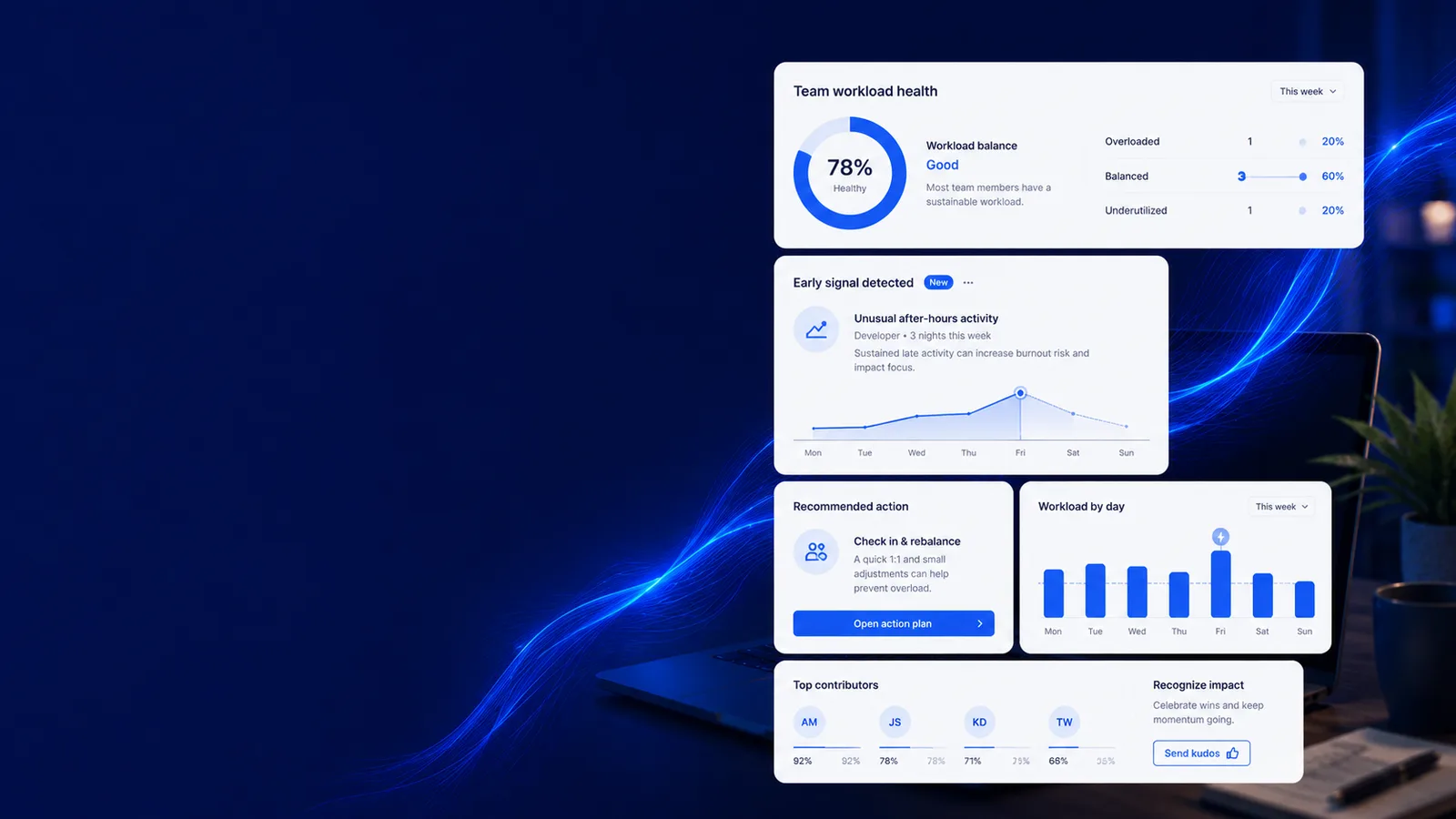
Catch anomalies with smart alerts
Alerting that earns the right to interrupt you
Every line here opens the screen it happens on. Judge the job on what it puts in front of a manager, not on the sentence describing it.
How it works
From a baseline to something worth reading
- 1
Establish the baseline
Anomaly detection sits on the same analytics as the productivity picture, so "unusual" is measured against your team rather than a generic threshold.
- 2
Put the agents on duty
Each agent runs on its own per-organisation schedule, reconciled continuously, so one tenant’s workload never delays another’s.
- 3
Ground the claim
Summaries cite the record they came from, evaluated for grounding, with a prompt-injection guardrail between the model and the data.
- 4
Deliver it, then measure it
Send to email or Slack on a schedule, and record what each run was worth on the agent ROI ledger.
Threshold alerts vs. a feed that is still being read in month three
workmonitor.vsThreshold alerting
6differences, worked through below
What triggers it
With WorkMonitor
Departure from a baseline drawn from your own activity, so a busy week does not read as an incident.
Threshold alerting
A fixed threshold somebody guessed at during setup and nobody has revisited.
Volume
With WorkMonitor
An anomaly feed plus scheduled digests, which is a different contract with the reader’s attention.
Threshold alerting
One alert per event, until the channel is muted and the whole thing is decorative.
Can you check the claim
With WorkMonitor
Evidence-cited summaries with a grounding evaluation, and the day reconstruction one click away.
Threshold alerting
A number in a notification with nothing behind it.
AI you can trust with the data
With WorkMonitor
A prompt-injection guardrail, grounding evals, and an ROI ledger recording what each run actually did.
Threshold alerting
A chat box with a system prompt and hope.
Where it arrives
With WorkMonitor
Email and Slack on a schedule, plus partner webhooks for anything you want to automate.
Threshold alerting
A console somebody has to remember to open.
Targets
With WorkMonitor
Targets evaluated on read, reporting "no data" honestly rather than defaulting to pass.
Threshold alerting
A green tick over a week with no data in it.
Everything behind alerts and agents
- Alerts & anomaly feed
- Integrity / anti-cheat signals (also raises Proof Ledger tier)
- Reports & delivery channels + verified-hours digests
Ask AI
Ask AI what changed
Every answer cites the record it came from, and a grounding evaluation runs before it reaches you.
Pick a question above and WorkMonitor AI will answer from your team's real numbers.
The status meeting, already written
Status is normally assembled by asking. Here it is already: hours, activity, attendance and risk on one board, for one person or the whole company. Set the thresholds once and it tells you who needs you.
Who runs this
Teams that cannot afford to find out late
Straight answers
The questions we would ask in your position
Every answer here is the one you would get on a call. Open as many as you like; they stay open, so two can be held side by side.
A threshold is a guess frozen at setup time; it fires on a busy week and stays quiet through a slow decline. The anomaly feed measures departure from a baseline drawn from your own activity, which is the only definition of "unusual" that survives contact with a real team.
They are named agents with specific jobs, the Burnout Guardian watching capacity signals is the clearest example, running on their own per-organisation schedule, reconciled continuously. They surface and draft; they do not take irreversible action on your behalf, and the ROI ledger records what each run produced so the value is measurable rather than assumed.
Only as far as it can show its work, which is why the Copilot cites the record behind each claim, why grounding evaluations run against those citations, and why a prompt-injection guardrail sits between the model and your data. A sentence it cannot tie back to the record does not get written.
Email and Slack through the delivery channels, plus scheduled saved reports that arrive weekly or monthly without anybody re-running them, and partner webhooks with HMAC signing for anything you want to automate yourself.
It reports no data. Goals are evaluated when they are read rather than snapshotted, and a green tick over an empty week is worse than an honest gap, it teaches people to stop looking.
Keep going
The jobs next to this one
Same record, read for a different question. Each one opens the page written for that job.
- Catch insider threats earlyEgress signals, anomaly detection and integrity checks on a hash-chained trail that records the investigators too, so the finding survives being examined.
- Score productivity & focusOne score per person, team or company, with the breakdown behind every one. Your categories rather than our defaults, and a capacity signal that names who is running hot.
- Manage remote & hybrid teamsOne live board across every zone, attendance in each person’s local day, capacity bands that name who is drowning, and a rollout that never touches a machine.
Take these with you
The software is the easy part of a rollout
Here is what we would send a manager doing one for the first time: how to read a productivity number, what to say to a remote team before anything is installed, and a policy you can adopt as written.
Point it at one team for a week.
Create the account, put the agent on a handful of desks, and leave it alone. On Friday you read the week instead of reconstructing it: hours against their projects, focus and idle per person, and the timesheets already filled in.
Free for two seats. No card, and no sales call to sit through.